Agents are increasingly becoming first readers of developer docs. Mintlify reports that almost half of all documentation site traffic is now AI agents. Standards like llms.txt paved the way, followed by tools like Context7, conventions like AGENTS.md, and structured skills. Resend is a useful case study: they optimized docs for agent consumption, with clear Q&A structure and code-heavy examples, and ChatGPT became one of their top three inbound conversion channels.
We're entering a phase where agents act more like domain experts, and they increasingly influence how projects are scoped and built. In other words, agents are moving upstream in the workflow, from answering questions to recommending architecture, tools, and integration patterns.
Naturally, building for this becomes crucial. Our goal is to build agent-native infrastructure and tools, but that does not mean sacrificing (human) developer experience. Even as engineers shift their workflows and habits to integrate coding agents, understanding how something works still matters. It helps you guide agents more effectively, think creatively about how to use features, and learn new patterns.
Creativity is inherently human (for now!), and the kind of understanding that fuels it has to come from somewhere. That's why we built the SDK Explorer.
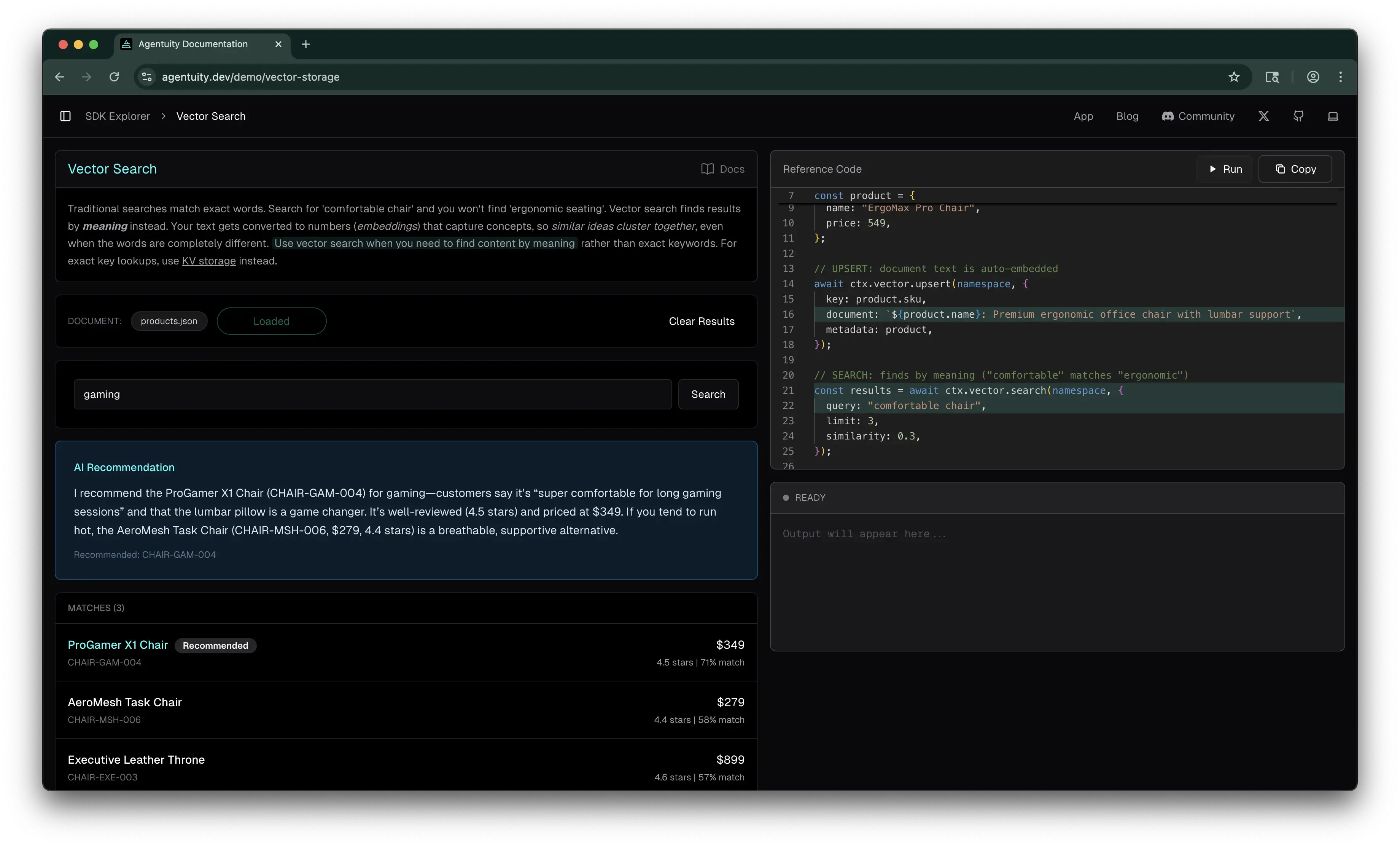
The SDK Explorer is an interactive guide to the Agentuity SDK, with hands-on demos, full reference code, and the ability to run that code in real cloud sandboxes, all from your browser.
Before we dive into that, let's review how we got here.
From the Kitchen Sink to the Explorer
The Agentuity Kitchen Sink was our first attempt at interactive learning. It gave you runnable agents covering the full spectrum of SDK capabilities, and it was a great way to poke around and see how things worked.
With our v1 launch, we shipped a ton of new capabilities: full-stack agents and projects, sandboxes to run code, a full evaluations suite, and more. On the old platform, we were limited to only running the Kitchen Sink in a dev environment. Now it's fully interactive, and most of these features are available to try in the Explorer.
What the Explorer Looks Like
The Explorer currently features 14 interactive demos (more coming soon!), organized into key sections so you can find what you need quickly. Each demo includes just-in-time explanations of key concepts, so you can get up to speed on how things really work before trying them. For example, our vector demo first explains what vector storage means, how it uses semantic search as opposed to a "fuzzy search", and links to related Explorer pages to keep learning.
Each demo page pairs an interactive experience with full reference code, so you can learn by doing first, then see exactly how it's built. Every demo also links to the full docs for deeper reading, which are just as useful for your coding agents as they are for you.
Reference Code, Running in Real Sandboxes
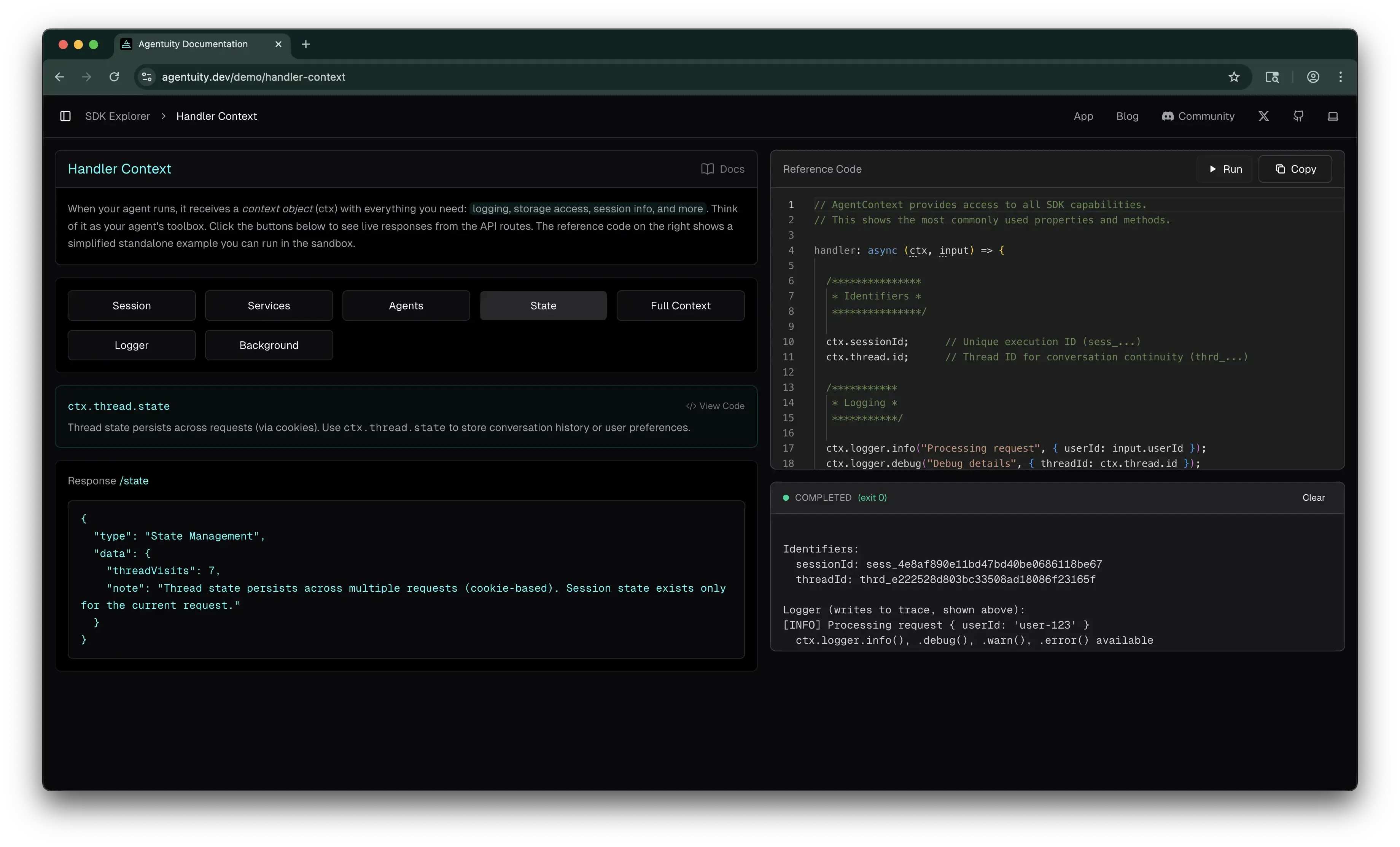
As we refined early iterations of the Explorer, we were able to not only show reference code, but also let you run it. Click "Run" on any reference code panel and it executes in an actual Agentuity sandbox, hitting real infrastructure: KV writes, vector searches, LLM calls via the AI Gateway, durable streams.
You'll see real session IDs, real agent output, and more. The same primitives your agents use in a deployed project.
Since the Explorer itself runs on Agentuity, it's also a nice bit of dogfooding for us, which helps us keep a pulse on how things are working across the platform.
A Few Standout Demos
Every demo in the Explorer is designed to be informative, but here are a few that we've gotten good feedback on and that are worth a try if you want to get a feel for the platform.
Handler Context — Click through session, state, logger, and waitUntil. See how the ctx object gives your agents access to logging, storage, session info, and background tasks. Click the same button a few times and watch thread state persist across requests.
Durable Streams — Generate a summary and get a permanent, shareable URL. Watch the content stream in real-time. Once the stream closes, that URL stays accessible. Great for exports, reports, and generated artifacts.
Evals — Ask a question, get a response from an LLM, then watch a different model evaluate the answer. You'll see both a completeness score (0 to 1) and a factual claims check (pass/fail). Evals run in the background after your agent responds, so they don't slow anything down.
What Developers Are Saying
Ben Davis, who builds and creates content around AI agents, said this about the Explorer in a recent video (paraphrased):
"If you want to see how any of this stuff works, they have one of the best documentation pages I have ever seen. On the SDK Explorer, you can click into a demo, see the reference code, and run it live."
Why This Matters
The agent-native approach drives how we think about developer experience. We want agents to thrive on the platform, and a big part of that is great docs, structured context, and machine-readable content. We even launched v1 with two companion posts, one for humans and one for agents. But this emphasis on agents doesn't take away from the experience we want to create for the humans building with us. If anything, it pushes us to be more intentional about both.
The Explorer is one expression of that.
Try It Out
Head over to agentuity.dev, try a few demos, run some code in a sandbox, and see how the SDK works firsthand. We'd love to hear what you think — drop us a note in Discord.